DagsHub now supports MLflow 3.x
- Dean Pleban
- 3 min read
- 3 months ago
Co-Founder & CEO of DAGsHub. Building the home for data science collaboration. Interested in machine learning, physics and philosophy. Join https://DAGsHub.com | DagsHub Co-Founder & CEO
We’ve shipped support for MLflow 3.x on DagsHub, so you can upgrade your MLflow client and keep using the same hosted tracking server that lives inside every DagsHub repo. No self-hosting, no extra infra, no “where did my artifacts go?” moments.
TL;DR: Upgrade to MLflow 3.x, point your code at your repo’s .mlflow endpoint, and keep tracking runs, artifacts, and models in one place.
What’s covered
- What changed in MLflow 3.x (and why it matters)
- What “MLflow 3.x support on DagsHub” means in practice
- A quick upgrade path (3 steps)
- A couple of migration gotchas to watch for
MLflow 3.x on DagsHub!
Why MLflow 3.x is a big deal (vs 2.x)
MLflow 2.x is mostly run-centric: you start a run, log params/metrics/artifacts, and maybe register a model afterward. That workflow is great for classic training loops, but it gets awkward when you’re dealing with many model variants/checkpoints or LLM apps/agents where the “thing you’re iterating on” is not a single training run.
MLflow 3.x shifts the center of gravity from “runs” to “models and applications”. The headline change is a new first-class entity called LoggedModel. Instead of treating a model as “an artifact inside a run”, MLflow can represent the model/app version itself as the primary object, and then attach runs, evaluations, traces, metrics, and metadata to it. This makes it much easier to compare “v12 vs v13” of an agent or checkpoint, even when those versions come from different runs or pipelines.
What’s new in 3.x (the practical differences)
1) Model logging becomes model-first
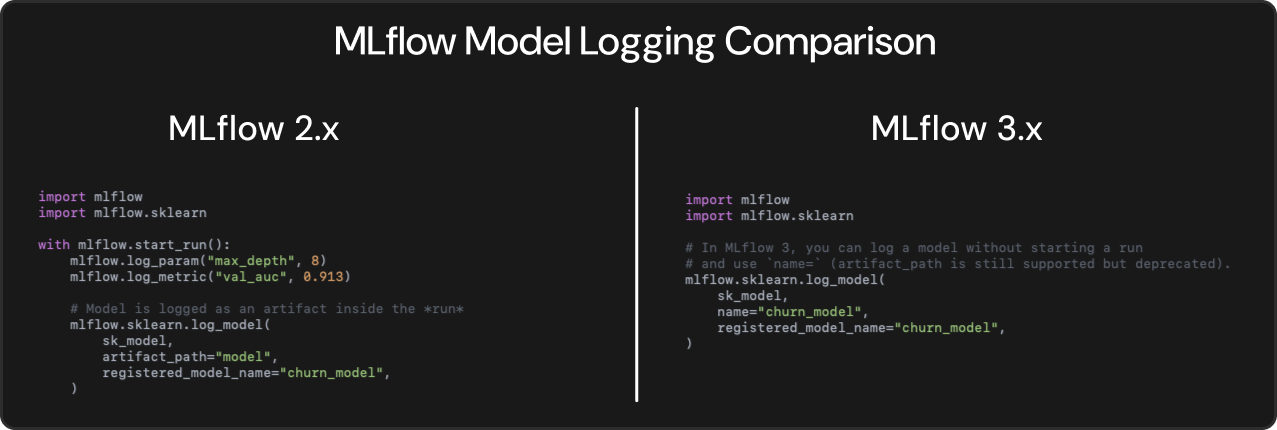
- In MLflow 3, logging a model no longer requires starting a run, and the logging API moves from artifact_path= to name= in many places. That’s a small code change, but it signals the bigger architectural move: models are no longer “secondary” to runs.
2) Production-grade GenAI observability (Tracing)
- MLflow 3 adds Tracing for LLM apps and agents: capture inputs/outputs and intermediate steps, with OpenTelemetry compatibility, so you can debug weird behavior and monitor what’s happening in real requests, not just offline evals.
3) Stronger evaluation and feedback loops for LLM workflows
- MLflow 3 leans into evaluating prompts/models on datasets, tracking results, and inspecting outputs alongside traces. This tightens the iteration loop for “prompt change -> quality change -> why did it change?”
4) Upgrade is usually straightforward
- The core concepts of experiments and runs remain, so most existing tracking code keeps working with minimal changes. The main differences show up when you adopt the new model-first and GenAI workflows.
What you get on DagsHub with MLflow 3.x
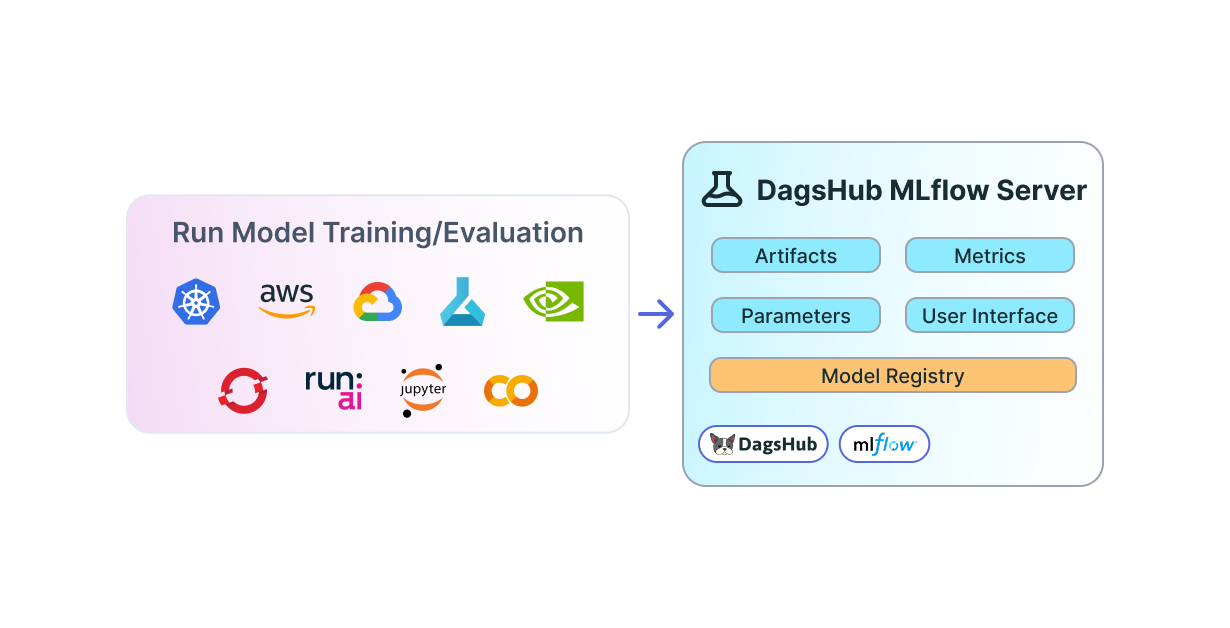
DagsHub provides a hosted MLflow server per repository, with team-based access control, a built-in MLflow UI, and support for logging experiments, artifacts, and using the model registry.
In other words: you can upgrade your MLflow version and keep collaborating around the same source of truth (code + data + experiments + models) in your DagsHub project.
Upgrade in 3 steps
- Install MLflow 3.x
pip install "mlflow>=3.1"- Point MLflow at your DagsHub tracking server with the
dagshub.initcommand (same as before):
import dagshub
dagshub.init(repo_owner="<user>", repo_name="<repo>', mlflow=True)- OR use the classic connection and Auth methods:
import mlflow
mlflow.set_tracking_uri("https://dagshub.com/<user>/<repo>.mlflow")
os.environ["MLFLOW_TRACKING_USERNAME"] = "<user>"
os.environ["MLFLOW_TRACKING_PASSWORD"] = "<dagshub_token>" # Get it from https://dagshub.com/user/settings/tokens
Migration note: model logging API changes
One concrete change to watch for: MLflow 3 updates model logging so it no longer requires starting a run, and it switches from artifact_path= to name= in the example shown in the migration guide.
Wrap-up
If you’ve been waiting to adopt MLflow 3.x but didn’t want to deal with hosting and access controls, this is the easy path: upgrade your client, keep your DagsHub tracking URI, and carry on.
If you hit anything weird during migration, drop into the community chat or reach out.